13 April 2018

Results! Hiring a Professional Genealogist

I finally did it. I hired professional genealogists to do what I can't: find my ancestors' records in a church in Italy.

Chiesa di Santa Marissima del Rosario, Pastene, Italy
My ancestors' church

For one full week I tried not to think about the two genealogists who were visiting the tiny hamlet where my ancestors lived.

And then came the results. Eleven high-resolution images of documents dating back to 1803. The images were numbered one to eleven, and a PDF file gave me a brief explanation of what they were.

Anxiously, I opened up my family tree and went to my grandmother's family. Her parents (last names Sarracino and Saviano) came from this little hamlet called Pastene. I've been there and visited the cemetery. I've viewed the town countless times on Google Earth. It's a long, thin string of houses and an old church. That's it.

Examining the Results

With my family tree on one monitor, I started going through the new images on another.

#1 The 1873 marriage record for Giovanni Saviano, the brother of my great great grandfather Antonio. I would have liked to learn the bride's mother's name, but this type of record includes no parents.

#2 The 1842 marriage record for Giovanni's and Antonio's parents, my 3rd great grandparents, Raffaele Saviano and Grazia Ucci. This confirms two facts for me:
  • my great great grandfather Antonio was their first-born child
  • my 3rd great grandmother's name was not Maria Grazia as I'd suspected, but Grazia.
#3 The 1864 marriage record for my great great grandparents Giuseppe Sarracino and Maria Luigia Muollo. One of my goals was to learn Maria Luigia's mother's name, but it is not there. It did tell me that my estimated birth year for one of their sons is almost certainly wrong.

Those are all great facts even though they don't provide what I really wanted: parents' names.

The rest of the documents had me puzzled. I wasn't quite sure who I was looking at. My family tree documents that Giuseppe Sarracino's (from document #3) father was Antonio. But was this him?

#4 The 1821 marriage record for Antonio Sarracino and Vincenza Perrella. Vincenza was from another town. Is he my Antonio?

#5 The 1826 marriage record for Antonio Sarracino and Anna Maria Muollo. Wait, what? I'm still not sure who's who.

#6 through #11 are records of households in the town. The church wrote these lists of the "souls" in their town, but to a genealogist, they're basically a census. OK, here we go.

1803: A husband and wife and their deceased parent's names. They have one son named Antonio Sarracino, age 4. So far, technically, this could be my 3rd great grandfather Antonio Sarracino. He's about the right age. But that's not proof.
1803 church record for Domenico Sarracino's household

1816: The same family with two more daughters.

1823: The same family, but now the mother has died, and Antonio's wife from document #4, Vincenza Perrella, has also died.

1827: Now Antonio no longer has his sisters with him. He has his father, the widower, and his new wife, Anna Maria Muollo from doument #5. They have a new baby named Teresa.

1827 church record for Domenico Sarracino's household

1833: The same family members plus two more children for Antonio and Anna Maria: Giovanni and Mariagrazia.

You know, I'm still not sure exactly what I've got here!

The last document. 1837: Antonio has a household of six people now. His father is not there and may have died. His children are all still alive. Teresa. Giovanni. Mariagrazia. And a new baby: Giuseppe Sarracino.

1837 church record for Antonio Sarracino's household
1837 church record for Antonio Sarracino's household. The youngest baby is my great great grandfather.

That's it! This is in fact the family of my great great grandfather Giuseppe Sarracino. Back up a minute. Now that I know who this family is, let's take a closer look at all the details.

From these six household lists, I've learned the names of:
  • My great great grandfather Giuseppe's three older siblings.
  • His mother's name and her parent's names. Those are my 4th great grandparents Francesco Saverio Muollo and Grazia Cimino.
  • His father's parents' names: Domenico Sarracino and Teresa Mastroberardino. They're also my 4th great grandparents.
  • Domenico and Teresa's parents' names. Those are my 5th great grandparents: Giovanni Sarracino, Rosaria Santangelo, Domenico Mastroberardino and Maria Tufo.
What an incredible revelation! The lack of civil documents for this town had me stuck. But these simple lists found in the church records brought me back three generations. This is something I can't imagine doing on my own. In this remote little town, my broken Italian wouldn't get me very far.

Now I am absolutely planning to go into that church on my upcoming visit to Italy. Simply standing there, knowing the names of many generations of my ancestors who were baptized and married there, will move me to tears.

So what's next? My researchers tell me there is a central church archive that may help me with my Saviano branch.

In the meantime, I have the names and ages of two new great aunts and a great uncle. There's a good chance that inside the Pastene records I've downloaded to my computer I will find their children. The records for those children may tell me more about their mother's Muollo ancestors.

The quest continues!
10 April 2018

You Can Read Foreign-Language Genealogy Records

"I don't understand the language" is not an excuse. You can find the facts you need on a foreign-language vital record.

The reason why you can is the format. Official records from your ancestor's town are usually written on a pre-printed form, or in a standard style. In most cases, it isn't hard to find the keywords: born, died, father, daughter, the twenty-third of May 1859. Find these words and you'll find the facts you need for your family tree.

Understand the Form or Format

As usual, I'm going to focus on Italian documents. That's where all my non-English document experience is.

Here are two examples of the basic formats you may find.

When you know which words to look for, it gets so much easier.

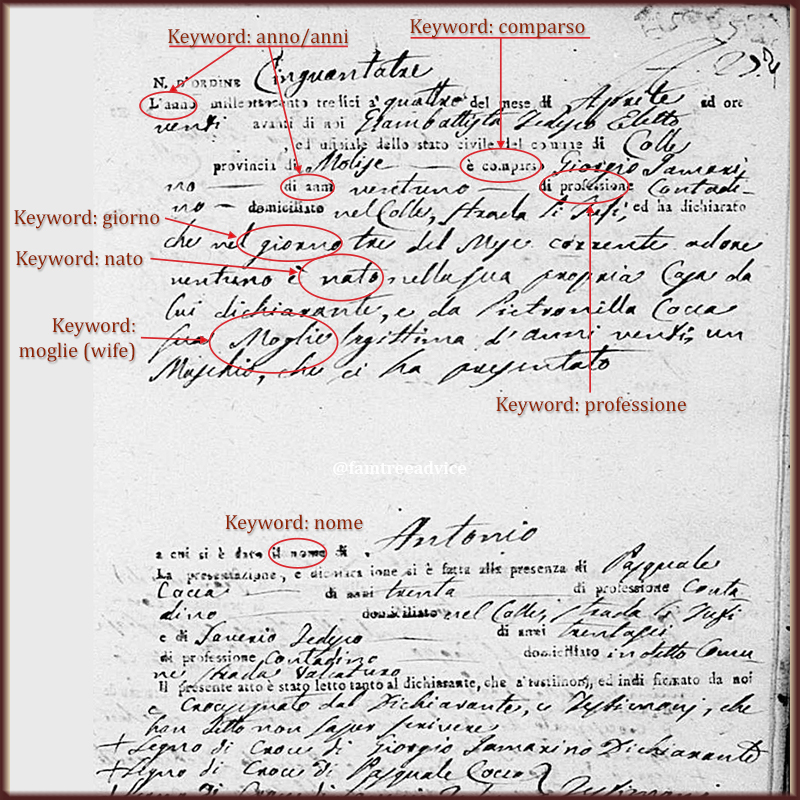
On this 1813 birth record (download a larger version), the handwriting is easier to read than the pre-printed words. The basic format includes:
  • Document number
  • Date
  • Town official's name and town name
  • Keyword: comparso. Look for the word comparso (appeared). It's followed by the name of the person reporting this event. Let's call them the declarant because they are declaring a baby was born. On a birth record, the declarant is usually the father of the new baby, but it may be the midwife or a close relative. You should see their age (di anni), profession (professione), and where they live (domiciliato).
  • On this document, the next section is a paragraph that follows a format. It says on this day of this month at this time in the home of the declarant was born a baby to him and his legitimate wife. The sentence may include the baby's mother's name, age and profession. The sex of the baby is written as masculine (maschio) or feminine (feminina).
  • The name given to the baby
  • The names, ages and professions of two witnesses who are familiar with this family
  • Signatures (or a mark, if a person is illiterate), including that of the mayor.
My takeaways from this birth record? Antonio Iamarino was born on 3 April 1813 to Giorgio Iamarino, a 21-year-old farmer, and his wife Pietronilla Cocca, age 20. They lived on Strada li Tufi in my grandfather's town of Colle. One of the witnesses has the same last name as the baby's mother. He may be a relative.

Here's a harder type of record. It may look intimidating, but when you know what to look for, it isn't so scary.

This is not a pre-printed form. But the keywords will help you along.

This document, written in 1820, was part of a set of marriage documents (download a larger version). It says that on 15 March 1810 Maria Viola died. She was the daughter of Gregorio and Angela Caporaso. She was the wife of the late Pietro Iamarino and 60 years old.

On a free-form document like this, start with dates. Then look at names and words for birth, death, baptism and relationships.

The key to breaking into this document is the word marzo (March) in the fourth line. The sentence begins, "A quindici marzo mille otto cento e dieci". If you study the numbers a little for the language you need, you'll recognize this as a date. It says "On 15 March 1810".

Immediately after the date is a name, Maria Viola. Then there's another keyword: figlia, meaning daughter. So the next names are her parents. Then we see moglie, meaning wife. So Maria was the wife of the next name, Pietro Iamarino who has died previously (the word fu tells us this).

Unless you're viewing a document with no idea where it came from, you have some context to help you. If you found this document, you'd know it's related to Francesco Saverio Iamarino whose parents were Pietro Iamarino and Maria Viola. The context will help you understand the document.

Locate the Keywords and the General Words

There is probably no better genealogical language resource than FamilySearch.org. You need an account to use this website, but it is free to join. The following pages offer the keywords for vital records and their English translation.
The pages above also offer the words for days, months, numbers and general words found on genealogy records. Get familiar with the language you need. It'll help you understand even more of the document. And when you're stuck on a word, try Google Translate. It may help you make sense of things.

Also check the language pages for other links to help you with handwriting, explain naming patterns in certain cultures and more.

Note: Bad handwriting or a low-quality image is a tougher challenge, but not impossible. Compare the difficult word to other words and letters on the document. If you think one letter in your problem word is a capital T, for example, compare it to another capital T in a word that is clearer to you.

I've read thousands of Italian vital records. I learned the Italian keywords quickly. I got used to the old-fashioned handwriting. Most of the time the important facts are very easy for me to understand.

You can do this! Get familiar with the important words. Find them in your document. Make sense of the facts.

Don't let your ancestor's language—the one you never learned—stop you from building your family tree.

06 April 2018

How to Be Better at Genealogy than at Your Job

Results of Following Genealogy Best Practices, Part 2

Last time I wrote about the priceless benefits of documenting an entire town. Today I'm focusing on another pillar of my genealogy philosophy. It can help you produce a valuable family tree.

Stick to Your Organization Style

I'm a terrific on-the-job learner. I've become a whiz at organization and efficiency. I like to apply best practices from my work life to my genealogy life.

Here are my top organization and documentation techniques. They've become second nature, and they make my tree stronger every day.

Do what's logical for you and what you think will be logical to your genealogy research heir.

The short version of what's to follow is this:
  1. Categorize: create high-level folders to hold your documents
  2. Recognize: name your files so they say what they are
  3. Annotate: add metadata to the image files themselves
  4. Find: add source citations to your facts right away
  5. Track: Keep an inventory of every document you've found
Categorize: Consistent Folder Structure

create logical, high-level folders
Early in my genealogy days, I began downloading and saving document images on my computer. I created a main FamilyTree folder with sub-folders for the major types of documents:
  • census forms
  • certificates (birth, marriage and death)
  • draft cards
  • immigration
I added more folders as necessary: naturalization, applications, passports. The combination of my simple file folder structure and file naming discipline makes it easy to click my way to a particular document. I don't have to search my computer or wonder if I'm overlooking the file.

Recognize: Logical File Naming

name your files in a way that makes their content clear
For me, the best way to name any image was this format:
  • last name
  • first name
  • type of document (only necessary in my "certificates" folder)
  • year
  • if needed, the file name includes -p1, -p2, -v1, -v2 to distinguish between files that should have the same name
Here's an example from my census forms folder:
  • AusterJacob1920.jpg
  • AusterJacob1925.jpg
  • AusterJacob1930.jpg
  • AusterJacob1940.jpg
I make a habit of naming census files for the head of household. In Jacob Auster's case, these file names are crucial because Jacob used a different first name each time!

These examples from my certificates folder show me all I have for someone at a glance:
  • PisciottiLuigiBirth1825.jpg
  • PisciottiLuigiPecoraAngelamaria1stMarriageBanns1848.jpg
  • PisciottiLuigiPecoraAngelamaria2ndMarriageBanns1848.jpg
  • PisciottiLuigiPecoraAngelamariaMarriageLicense1848.jpg
  • PisciottiLuigiPecoraAngelamariaMarriage1848.jpg
It looks like I need a death record for Luigi Pisciotti.

Annotate: Useful Image Annotation

annotate your images with metadata
As soon as I download an image, I crop it in Photoshop, name it according to my style and save it in the proper folder. Then I right-click the file, choose Properties and click the Details tab. I fill in the empty Title and Comments fields. Whatever I put there stays with the image file.

For the Title, I enter exactly what I want to see in Family Tree Maker, like "1825 birth record for Luigi Pisciotti". In the Comments field I include the URL where anyone can find the original file. If it applies, I'll include the line number(s) of interest.

When I add the image to Family Tree maker, it imports those two fields.

Anyone finding a common ancestor in my tree on Ancestry.com also sees those important image details. To learn more, see How to Increase the Value of Your Family Tree Images.

Find: Thorough Source Citation

create detailed source citations to add to your facts
I like my source citations to be simple. For all the census years, I name the citation as simply as "1930 U.S. Census". Most other sources I name exactly as they appear on Ancestry.com. For example, "New York, Index to Petitions for Naturalization files in New York City, 1792-1989".

But in the Citation detail field I add the description of the document collection, taken right from the source. Example: "Ancestry.com. New York, Index to Petitions for Naturalization filed in New York City, 1792-1989 [database on-line]. Provo, UT, USA: Ancestry.com Operations, Inc., 2007."

In the Citation text field, I copy more information from the source. Example: "Soundex Index to Petitions for Naturalization filed in Federal, State, and Local Courts located in New York City, 1792-1989. New York, NY, USA: The National Archives at New York City."

The important thing is to add a source to each fact as you enter it. Adding a birth date? Attach the source. Adding an address? Add the source. Immediately. To learn more, see Trade Up to Better Family History Sources.

Track: Sanity-saving Document Inventory

While this last item is important to me, some of you may think it's nothing but extra work. I keep a single spreadsheet of each document I've attached to someone in my family tree.

here's everything I've collected on one person

If I'd opened that spreadsheet this morning, I wouldn't have bothered downloading a 1907 marriage record for a cousin—because I already had it! You can't keep all these facts in your head. A document tracker keeps you from wasting your time. Plus it shows you what you're missing. To learn more, see Track Your Genealogy Finds and Your Searches.

Next time you download a document image for your family tree, think CRAFT. If you've already got your category folders created, think RAFT (picture actor George Raft flipping a coin). Recognize means name your files in a way that helps you recognize what they are in the future. Annotate means add details to the properties of each image so it makes sense even out of context. Find means add a source citation to each fact so you can find where it came from. Track means update your inventory so you'll always know what you've found.