28 July 2020

Can Your Genealogy Work Survive Without You?

Act now to preserve your genealogy treasures and leave instructions.

It happened again. While seeking a source for facts in my family tree, I learned a distant cousin had died. This man jump-started my research into our shared Caruso branch.

More than 10 years ago, he mailed me a book about our shared ancestral hometown. He also sent postcards and a brochure from a lodging he recommended when I visit. The book includes a few handwritten notes about our common ancestors.

I said I'd read the book as fast as possible and mail it back to him. He said, "No, you keep it. My children aren't interested in our heritage at all." That made me so sad.

Today my husband pointed to a new pile of letters and keepsakes my mom mailed to me. He said, "So if you die first, do I throw them out?"

I can hear you all shouting No! But do you have a plan in place? What will happen to your countless hours of research when you're gone?

Think through what you have. Decide on—and document—your succession plan today.

Original Documents


I'm not a big paper person. I have a very small collection of official birth, baptism, marriage, and death records. But you may have stacks of them.

Consider storing them in archival-quality boxes. And keep the boxes in a safe place. I inherited a large metal storage cabinet with drawers, a combination safe, and a door. I've moved all the family photos, baby books, and yearbooks into this cabinet.

It'll be a good place to store my recently acquired letter from my Uncle Johnny. He wrote home to tell my grandparents he was promoted to Staff Sergeant and would be able to send home more money. He dated the letter July 1, 1944. He died when his plane was shot down on a bombing run 6 days later.

Be sure to add sheets of paper that explain what everything is.

Document your family heirlooms as you preserve them for the future.

Keepsakes


These can come in all shapes and sizes, and their meaning can fade over time. My mom sent me her Washington Irving High School beret, which I recognized from old photos. She graduated in 1949!

My sons won't know what it is, but it conjures up a memory for me. Decades ago, I was in the summer home of my ex-in-laws, retrieving something from the attic. I spotted something intriguing. It was a black bowler hat, perched atop a styrofoam head. Pinned to the hat was a handwritten note that said, simply: "Uncle Anton's hat."

I didn't know who Uncle Anton was at the time, but I never forgot that hat. When I did some research into the family, I found Anton as a young man in Wisconsin. That old keepsake brought Anton's paperwork to life for me.

You need to pass on the story of each keepsake. You can do it verbally, write it down, or both.

Photographs


I paid a professional photographer for help with my grandparents' 1922 wedding portrait. He photographed it, digitally retouched the damaged areas, and put the new print in my old frame. The original photo is safely wrapped and stored away.

You can correct creases, tears, and color loss by scanning your family photos. Think about different platforms for sharing these treasures with your relatives. I used an invitation-only Pinterest board.

Find a safe place to store the originals, and keep backups of the digital files, too.

Digital Files


I have tons of digital historical files in my family tree collection. But it's the vital records that are most precious. Future researchers can find the census files online, the same as I did.

But my set of Italian vital records from a handful of my ancestral hometowns is unique. My copies of the documents are searchable by name. That's because I've been renaming each file to include the name of the person in the document.

This is something I want to share with other descendants of the towns. I don't own the files, but I own the work I've done.

I have all the files on my computer and synchronized on OneDrive. Once a week, I make an off-computer backup of each digital file I've added to my family tree.

I have a specialized database that will appeal to a particular audience.

Your Family Tree


I synchronize my Family Tree Maker file with Ancestry.com after each session of work. To me, this is the best way to make my work available to anyone who might care.

I make backups once or twice during a long day of research. I copy the backups to an external drive each Sunday. They sit on OneDrive, too.

Even if you're already preserving your family tree work, there's one important step we all need to take. Type up a document that explains all you've done. Tell your unnamed successor where to find all the bits and pieces you've stored. Make sure the most important people in your life know what you've done and where to find it.

I want you to enjoy the process of doing genealogy research. But I also want you to work on your family tree as if you'll be gone tomorrow. Your family tree is your legacy. Make sure your work outlives you.

24 July 2020

Catch and Fix Your Missing Source Citations

Wouldn't it be great to have a safety net to catch all your forgotten source citations?

At times we all overlook adding sources to the family tree. When we start out, we don't know any better. Other times we forget or can't be bothered. These unsourced facts add up. And they make our online trees look less reliable.

There are a few reasons why facts in my family tree are missing a source citation:
  1. I never add a source for a person's sex. It seems unnecessary.
  2. I never add a source for an estimated birth year. If it's an estimate, there is no source. It's 25 years before the birth of their eldest child or 25 years after the birth of their younger parent or the same year as their spouse.
  3. Something happens to distract me in that moment.
  4. I experienced the fact (such as attending a wedding or funeral) but have no documentation.
  5. I'm in an excited rush because I just found all this great information, and I can hardly believe my luck!
Most of the time it's #5.

So, how do we find these unsourced facts before things get even more out of control? In a word: software.

It's easy to create an Undocumented Facts report in Family Tree Maker. Go to Publish / Source Reports / Undocumented Facts. I chose to share it as a CSV file. You can open a Comma-Separated Values file as a spreadsheet in a program such as Excel.

But there is a far better way to do this. This method has more steps, but it will save you so much time in the end.

Follow the steps to create a report and see where sources are missing.

I've written many times about the free Family Tree Analyzer program. (Find all articles on the Genealogy Lessons page.) There are so many incredibly useful things to do with it. Now I find it's a great way to identify all your unsourced facts.

Here's how:
  1. Open your latest GEDCOM file with Family Tree Analyzer. (You can export a GEDCOM file from your family tree software, or download it from your online tree.)
  2. Click the Facts tab and check the boxes for all relationship types.
  3. Click the button to Select all Fact Types.
  4. Click the right arrow, which will duplicate the list of fact types.
  5. In this duplicate list, check the box for any fact types you don't want to include in this report. You should exclude facts that you know don't need a source. For example:
    • Child Born. The baby gets a source for their birth date. The parent doesn't need a source for having had the kid.
    • Custom facts. I have a custom Ahnentafel Number fact that doesn't need a source. If you have custom facts, you'll find them in this list in all capital letters.
  6. Click the big button that begins with "Show only the selected Facts for Individuals…."
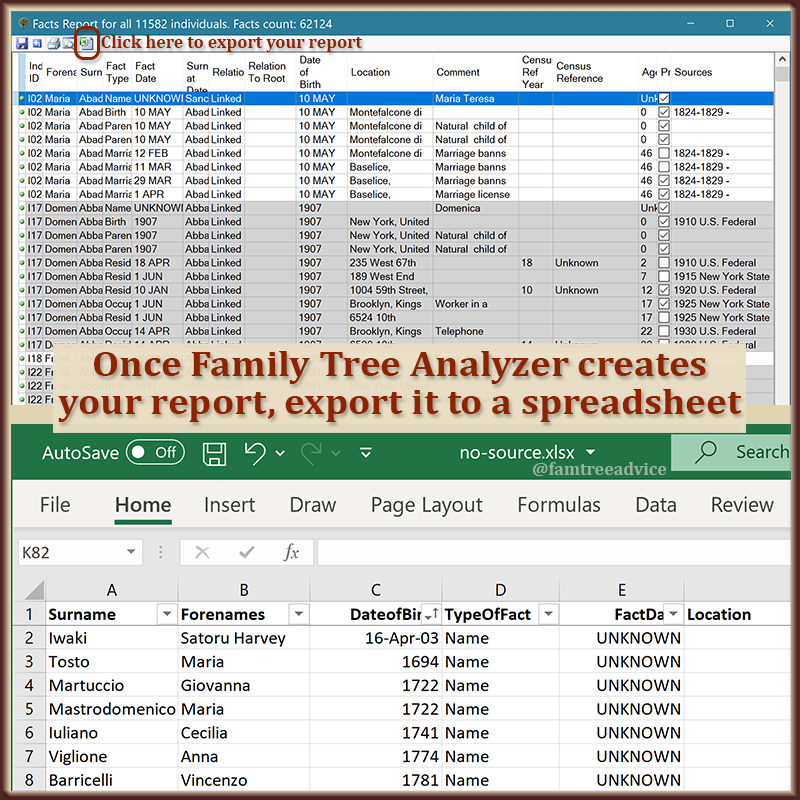
Your report opens in a new window. At the top of that window, choose to export this report as an Excel file (actually a CSV file). Now open the file in your spreadsheet software.

First, sort the spreadsheet by the source column and delete the many, many rows of facts that DO have a source citation.

Next, delete the unnecessary columns to make things easier to see. I deleted all but Surname, Forenames, DateofBirth, TypeOfFact, FactDate, and Location.

Choose to export your report from Family Tree Analyzer to a spreadsheet.

I'm left with an awful lot of rows of unsourced facts. But remember, I said I don't source estimated birth years. I can sort or filter the spreadsheet by the DateofBirth column and delete all the rows with "Abt" (short for About). That brings me down to a very manageable 133 rows of unsourced facts.

Finally, I'll sort the data by Surname so I can make my way through this task list. I'll delete a row once I've added the missing source citation to my family tree.

I know the complete dates from the 1800s fit into the category of "I'm in an excited rush." I have the documents to back up these dates. Now I need to go back and finish my work. I suspect some of the years (not full dates) in the 1900s will be birth years I took from a census sheet. Again, I need to finish my work.

It's nice to have this report as a safety net for days when you aren't on your best behavior. It's as if Family Tree Analyzer is your coach or teacher, reminding you to think about what you're doing. And by all means, show your work!

21 July 2020

How to Use the Power of Shared DNA Matches

There is a way to get a good handle on those tree-less DNA matches.

I bought my DNA test from Ancestry DNA 8 years ago. Lately I've explained a handful of ways to figure out your DNA matches. You'll find them in the DNA section of my Genealogy Lessons page.

Today let's look at one of my new favorite features of Ancestry DNA: shared matches.

I've uploaded my raw DNA file to other sites, including GEDmatch, Family Tree DNA, 23 and Me, and My Heritage. But Ancestry gives me the best tools to use.

I imagine I'd get more tools from the other websites if I had a paid membership! I did pay a one-time fee to Family Tree DNA, and I see they do have a "Matches in Common With" feature. Check your testing site for something like what I describe below.

I love the Shared Matches feature on Ancestry. Keep in mind that this is extra important for those DNA matches who haven't attached a usable family tree.

Ancestry lets you add each DNA match to groups you create. Once you do, that match gets one or more colorful dots attached to their listing. I use a green got to signify that I've figured this person out. So I'll scroll down to find a DNA match without a green dot. I want to focus on my mother's side of the family. My father's side has a gazillion matches, all coming from one ancestral town! My mother's side has far less matches.

When your DNA match offers little or no clues, don't forget to look at your shared matches.

My 1st match on my mother's side without a green dot has a last name I know. It starts with a V. This name is from a town tied to my maternal grandmother's family. It's called Pastene, and it's very small.

His tree is as useless as it gets. It has 1 private person. Him! When I click Shared Matches on Ancestry, I see that besides my mother, we share only 4 DNA matches. I recognize 2 of our shared matches as being descendants of that same last name. I know this because I've corresponded with them and explored one of their trees.

Another shared match has my grandmother's maiden name, so I know his roots are also in Pastene. I'll add a note to this match's profile that says he's a V from Pastene.

But I can keep going. I clicked the match with Grandma's maiden name. He also has no family tree, but I can look at his shared matches. This list includes everyone from the previous shared matches list, and several more.

I see one match who I know had a grandmother with my Grandma's maiden name. I see another match whose handle appears to be an abbreviation of that maiden name. Her shared matches support that idea.

One other match has a last name I know from a different, but connected town. You see, my 2nd great grandfather was from Pastene, but he married a girl from nearby Santa Paolina. This match has a name that's prevalent in Santa Paolina to this day.

Following this method, I can add notes to the profiles of unknown matches. The notes can include last names I know and towns. Over time, these notes will help me see how different matches may fit together.

I can continue to click interesting shared matches and view our shared matches. Here's a person with a decent tree of 243 people. On both the mother's and the father's side of this tree, I see last names from Santa Paolina. Lately I've been reviewing my downloaded vital records from Santa Paolina. I'm getting very familiar with the town's names as I change the file name of each document image. For each image, I'm adding the person named on the document and their father's first name.

I know I can find vital records for this DNA match's grandparents and generations before them. This is a match I can figure out!

Make notes and use groups to leave yourself research breadcrumbs.

When I figure them out, and work them into my family tree, I'll have strengthened my ties to our shared DNA matches. More "common names" will appear in our trees.

If your DNA website lets you add categories or notes to your matches, do it. (Do this offline in a spreadsheet, if you must.) Leave yourself these useful breadcrumbs. If you know the general branch a match should fit into, note that. If they have last names you know, notes them.

It's impossible to count our thousands upon thousands of DNA matches. But categorizing many of them, and figuring out those you can, can help you get to the result you want. And that is, fewer empty branches on your family tree.